> ## Documentation Index
> Fetch the complete documentation index at: https://gcore-doc-1046.mintlify.site/llms.txt
> Use this file to discover all available pages before exploring further.
# View user actions
You can view all logs of user actions in the Gcore Edge Cloud on the **User Actions** page.
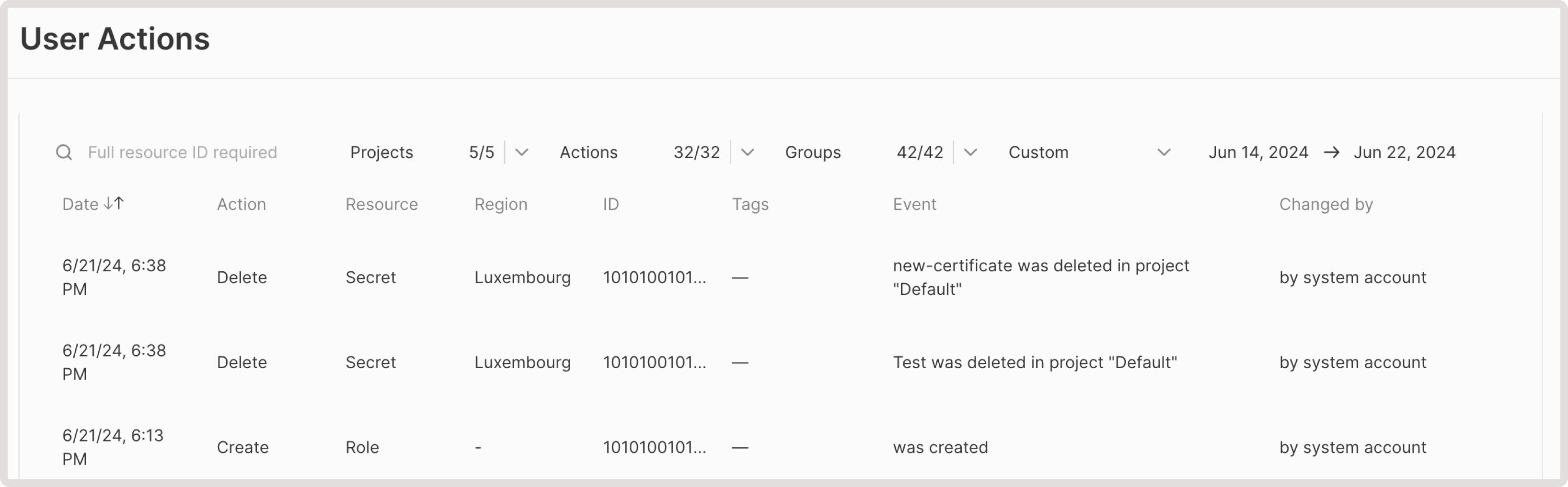 The section has filters for:
* ID (resource name, including Load Balancer VIP addresses)
* Project
* Action (performed with the resource)
* Group (type of resource)
You can also select the specific time gap.
List of actions with resources which are being logged in Cloud: attachment, creation, deletion, detaching, downloading, hard reboot, Load Balancer, reboot, request, resize, resumption, retyping, start, stop, suspending, updating.
The section has filters for:
* ID (resource name, including Load Balancer VIP addresses)
* Project
* Action (performed with the resource)
* Group (type of resource)
You can also select the specific time gap.
List of actions with resources which are being logged in Cloud: attachment, creation, deletion, detaching, downloading, hard reboot, Load Balancer, reboot, request, resize, resumption, retyping, start, stop, suspending, updating.